Cute Fish Clipart Set: A Practical Guide for Creators and Business Owners
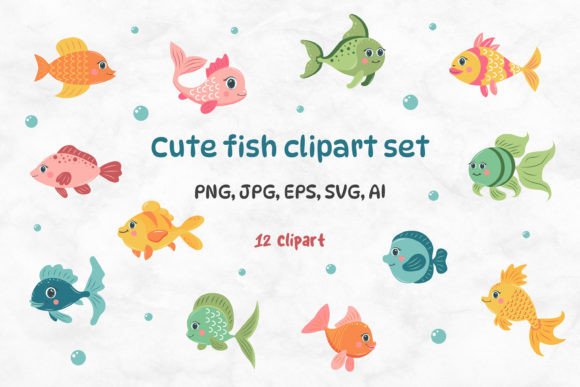
Finding the right visual assets can make or break a creative project. When you are designing merchandise, planning a classroom activity, or building a brand identity, the quality of your graphics matters more than you might initially realize. The Cute Fish Clipart Set offers a curated collection of 12 distinct cartoon fish designs that cater to a wide range of applications. From shirt printing and mugs to web design and invitations, these files are engineered to be versatile. However, simply downloading a clipart pack is not enough; understanding how to utilize these assets effectively is where many creators stumble.
Understanding What Makes This Collection Valuable
The appeal of a Cute Fish Clipart Set lies in its balance between charm and technical utility. Unlike generic stock photos that often look stiff or overused, cartoon-style illustrations bring personality and warmth to any design. Whether you are an entrepreneur launching a line of children's swimwear or an educator creating engaging lesson materials, these 12 different kinds of cartoon fishes provide a cohesive yet varied aesthetic.
What truly sets this specific set apart is the comprehensive file structure included in the ZIP download. You receive 12 PNG files with transparent backgrounds, 12 SVG files for scalability, 12 JPG files on a white background, plus AI and EPS vector files containing all 12 elements. Each design is rendered at a high resolution of 300 dpi with an RGB color model, ensuring crisp details whether you are viewing them on a screen or printing them on a physical product. The largest side measures 12 inches, which is substantial for most standard print jobs.
Common Mistakes When Choosing Digital Assets
Many beginners and even some experienced designers fall into traps when selecting clipart. One frequent error is assuming that "high resolution" means the image will work for every size. While the Cute Fish Clipart Set provides 6250 x 4167 px images, using a raster format like PNG or JPG for massive billboards or oversized banners can still lead to pixelation if scaled beyond the intended limits. Relying solely on the preview thumbnail is another common oversight. Thumbnails often hide compression artifacts or lack the detail necessary for close-up inspection.
Another misunderstanding involves file formats. Many users download a pack and immediately try to use the JPG version for everything. This is problematic because JPGs do not support transparency. If you place a fish with a white background onto a colored t-shirt or a patterned mug, the result will be a boxy, unprofessional square around the fish. Ignoring the importance of the SVG and AI files is also a missed opportunity. These vector formats allow you to resize the fish to any dimension without losing quality, a feature essential for professional-grade output.
How File Choices Impact Your Final Product
The choice of file format directly affects the usability, efficiency, and final presentation of your work. Using low-resolution or incorrect formats can lead to wasted time, increased costs due to reprints, and a diminished brand reputation. For instance, if you order 50 tumblers printed with a blurry fish graphic because you used a small JPG instead of the provided SVG, you have incurred a significant financial loss and potential customer dissatisfaction.
Furthermore, color models matter. The Cute Fish Clipart Set uses the RGB color model, which is perfect for digital screens and standard home printers. However, if you are sending these files to a professional offset printer for large-scale production, you may need to convert the colors to CMYK. Failing to check this compatibility before starting a large run can result in colors looking dull or shifting unexpectedly in the final print. Understanding these nuances ensures that the vibrant, cute nature of the fish remains intact across all mediums.
Strategic Advice for Maximizing Your Clipart Investment
To avoid these pitfalls, start by organizing your files immediately after unzipping the Cute Fish Clipart Set. Separate the vector files (SVG, AI, EPS) from the raster files (PNG, JPG). Keep the vectors as your master copies for any project requiring resizing or editing in software like Adobe Illustrator or CorelDRAW. Use the PNGs with transparent backgrounds for layering in Photoshop or Canva, especially when placing the fish over complex patterns or photographs.
Before committing to a physical product, always perform a test print. Print one fish at full scale on regular paper to inspect the edges and color saturation. This simple step can reveal issues that are invisible on a monitor. Additionally, take advantage of the variety within the set. Instead of using just one fish repeatedly, mix and match the 12 different kinds to create dynamic compositions. This approach adds visual interest and makes your designs feel more custom and less template-based.
Real-World Applications and Better Approaches
Consider a scenario where you are designing a birthday invitation for an under-the-sea theme. A beginner might drag a JPG fish onto a blue background and call it done. A better approach is to use the SVG file to adjust the fish's pose slightly or change the scale to fit the layout perfectly. Then, use the PNG version to overlay a shadow effect for depth. This attention to detail transforms a simple graphic into a polished design element.
For entrepreneurs selling on platforms like Etsy or Amazon, the versatility of this set allows for cross-category expansion. You can use the same fish designs for stickers, pillows, bags, and albums. By utilizing the high-resolution 300 dpi files, you ensure that customers receive products that look sharp and professional. The inclusion of both light and dark variations (implied by the ability to edit vectors) allows you to adapt the designs for different fabric colors, expanding your market reach without needing to purchase new assets.
What to Check Before You Download or Buy
Before finalizing your decision to use the Cute Fish Clipart Set, verify the license terms associated with the files. Ensure you understand the scope of commercial use allowed. Does the license cover unlimited prints, or is there a cap on the number of items you can sell? Clarifying this upfront prevents legal headaches down the road. Also, confirm that your design software supports the included formats. While most modern tools handle SVG and PNG easily, older versions of certain programs might struggle with AI or EPS files.
Finally, assess the style against your brand or project needs. While these are described as cute and cartoonish, they should align with the tone you wish to convey. If your brand is ultra-minimalist or corporate, these playful fish might clash. However, for educational materials, children's products, summer-themed events, or lifestyle brands, they are an excellent fit. With love ❤ Julia, the creator has designed these elements to be user-friendly, but your success depends on applying them with care and knowledge.
By avoiding common mistakes and leveraging the full potential of the file formats provided, you can elevate your projects from good to great. The Cute Fish Clipart Set is more than just a collection of images; it is a toolkit for creativity when used correctly. Take the time to explore each file type, test your designs, and apply these practical strategies to ensure your final creations stand out in a crowded marketplace.